Upselling from your welcome book
Your guests open your welcome book several times during their stay. It is the only moment when they are free, on site and already confident in you.
- 1The moment when the guest is genuinely free
- 2What genuinely sells in short-term rental
- 3Setting a price that causes no hesitation
- 4Setting up upselling with Stripe
- 5The PayPal option, quicker to set up
- 6Track what gets clicked, and what does not
- 7Placing your products in the welcome book
- 8Two extra touchpoints that make the difference
- 9Product ideas to get you started
- 10Three mistakes that ruin everything
- 11Start with two products, not twelve
- 12Frequently asked questions
The keys have been handed over, the QR code has done its bit of magic, your guests are settled in. That is precisely the point where most hosts stop, just as the relationship is beginning.
Over the following days, your guests will open your welcome book several times: for the wifi code, for the check-out time, to find a restaurant. Every one of those visits is a chance to offer them something useful. Not to sell to them: to save them a trip.
A bottle of wine, a sharing platter, a canoe trip, a late check-out: all of it can be offered straight from the welcome book. Here is what genuinely sells, at what price, and then the steps to set it up.
The moment when the guest is genuinely free
An offer sent by message before arrival lands in a crowded moment: the guest is packing, sorting out transport, not thinking ahead. The same offer read from the sofa of the property, on the first evening, lands in an empty moment.
That is the whole difference between a sales follow-up and a service. The guest asked for nothing, but they are in your property, they are hungry, and they do not know the area. A charcuterie platter offered at that moment does not feel like selling.
What genuinely sells in short-term rental
Three families work well, and one fails regularly.
Anything that saves a journey. The arrival hamper with breakfast supplies, bread ordered the day before, a bottle of wine from a nearby producer. A guest who arrives at 9 pm with tired children will buy without a second thought.
Anything that solves a constraint. End-of-stay cleaning, late check-out, early check-in, extra linen. These are services whose value the guest already knows, because they have seen the price elsewhere.
Anything that gives access to something local. A canoe descent, a wine cellar visit, bike hire from the shop in the village. You put nothing up front, you simply connect people, and plenty of providers will accept a commission.
What fails, on the other hand: branded merchandise and souvenir items. Guests in a holiday rental are not there for that.
Setting a price that causes no hesitation
The rule is simple: the service must cost less than the effort it saves. An arrival hamper at 25 € sells, because the supermarket is twenty minutes away and closes at 8 pm. The same hamper at 45 € does not sell, because the guest would rather go themselves.
For comfort services, compare with what the platforms display. A late check-out charged at 20 € or 30 € goes through without discussion. Above that, the guest feels they are being charged for a favour.
Three families work, one falls flat: here is what each one contains, the price that goes through and the moment to show it.
| What you offer | Examples | Price that goes through | When to show it |
|---|---|---|---|
| What saves a trip out | Arrival basket, bread ordered the day before, a bottle from a nearby producer | €25 yes, €45 no | Visible from day one |
| What solves a constraint | Late check-out, early check-in, end-of-stay cleaning, extra linen | €20 to €30 for a late check-out | At least two days before the end of the stay |
| What opens up the local area | Canoe trip, cellar visit, bikes from the village rental shop | Nothing to advance, commission from the provider | The first evening, once the guest has settled in |
| Branded goods and souvenirs | Items with your own name on them, souvenir objects | Fails again and again | Leave it aside |
Setting up upselling with Stripe
1. Create your Stripe account
Go to stripe.com and follow the sign-up steps.
Enter your details there, with a SIRET number compulsory in France; if you are based outside France, select your country and Stripe updates the information requested. Then confirm your email address.
2. Set up your business
Once logged in, add your business information.
Once you are logged in, click on “Start now”, enter your identity, bank details and trading name, then verify your identity: the check takes 24 hours at most.
3. Create your first product
In the Products tab, choose “Add a product”, give it a name and an appealing description, then set the payment type, one-off or recurring.
4. Generate your payment links
Still under Products, open “Payment links” and click “+ Create a payment link”. Select your product, switch on the options you want, then copy the link: that is what you will paste into the welcome book.

The PayPal option, quicker to set up
Create a PayPal account
- Go topaypal.com
- Choose between a personal or a business account
Create a PayPal.me link
Then activate your personal link at paypal.me, add a photo if you like, confirm your personalised address and your payment link is ready.

Track what gets clicked, and what does not
A payment link is good. A short, trackable link is better.
- Create an account onbitly.com
- Click on"Create link"and paste in your Stripe or PayPal link
- Bitly gives you ashortened version(e.g. bit.ly/yourshop)
Bonus: you get access to click statistics in real time.

Placing your products in the welcome book
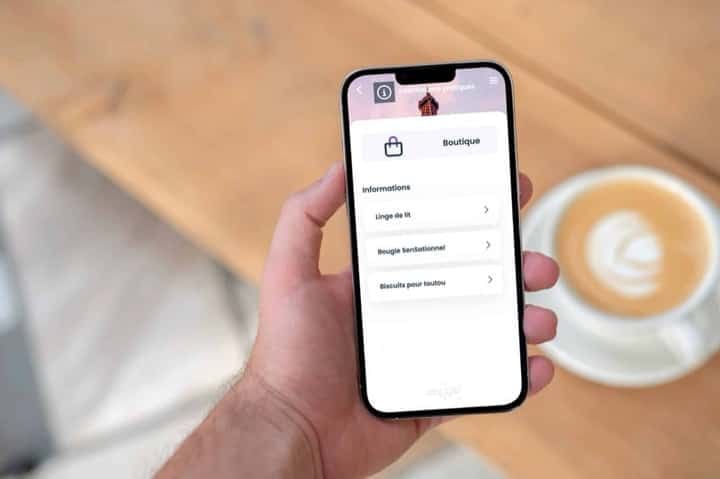
Add a "Boutique" category to your welcome book and insert your payment links with a short description and a photo of your product. Your guests can then browse and buy in one click:
Open your welcome book, go to the Practical info module and create a new category, “Local Boutique” for instance, with its icon. Add your products one by one: the name in the title block, a short description containing the Bitly payment link, and photos to show the product off.
Your guests will see a neat list of products to buy as soon as they tap the category.
Quick tip: you can also add your Boutique to the check-in and check-out info modules for more specific products.

Two extra touchpoints that make the difference
The first one is the welcome email. Slip a friendly line and the link to your Boutique straight into it, for example “During your stay, take a look at our selection of local products: view the Boutique”.
The second is a QR code dedicated to upselling: generate it with the link to your Boutique and display it in the property, simple and visual. The site “Mon Affiche QR Code” turns it into a personalised poster.

Product ideas to get you started
Here are a few product ideas to create for your upselling:
- Household linen (towels, bed sheets)
- An earlier or later check-in/check-out
- Breakfast
- End-of-stay cleaning
- Local produce (jams, honey, wine, beers, soaps, etc.)
- Arranging guided tours

Three mistakes that ruin everything
Offering too late. An offer discovered the day before departure is no longer of any use. The arrival hamper needs to be visible from day one, the late check-out at least two days before the end of the stay.
Mixing the commercial with the practical. If the wifi code and the charcuterie platter are fighting over the same screen, the guest can no longer find the code and does not buy the platter. Practical information should stay practical information.
Promising what you cannot deliver. A hamper offered when you are not available to deliver it turns into a bad review. Two services you always deliver are worth more than eight of which three fall through.
Start with two products, not twelve
The temptation is to offer everything at once. That is the surest way to get no feedback on anything and to have no idea what to fix.
Take the service your guests already ask you for unprompted, and the one that costs you the least effort. Two lines are enough. After one season, you will know which of the two performs, and you can add a third knowing exactly why.
Frequently asked questions
Stripe or PayPal, which one should I choose? Both do the job. PayPal is quicker to set up: you create an account, you activate your paypal.me link and you are ready. Stripe takes a little longer, with a SIRET number required in France and an identity check that takes 24 hours at most, but it lets you build real products and real payment links.
How many products should I start with? Two. Take the service your guests already ask you for spontaneously, and the one that costs you the least effort. Twelve lines at once will teach you nothing, because you will not know what worked. After one season, you will add a third one knowing exactly why.
How much should I charge for a welcome basket? The service has to cost less than the effort it saves. A 25 euro basket sells when the supermarket is twenty minutes away and closes at 8 pm; at 45 euros, the guest would rather drive there. For a late checkout, 20 or 30 euros goes through without discussion, beyond that it feels like paying for a favour.
When should I offer these services during the stay? On the first evening, once the guest has settled in and has time. An offer sent before arrival lands in a crowded moment: suitcases, transport, nothing gets planned. The welcome basket has to be visible from day one, the late checkout at least two days before the end; an offer discovered the night before departure is useless.
Where do I put the shop in the welcome book? In the practical information module, by creating a dedicated category with its own icon, "Local shop" for instance. Add your products one at a time: the name in the title block, a short description containing the payment link, photos. Keep it away from the rest: if the wifi code and the charcuterie board fight over the same screen, the guest no longer finds the code and does not buy the board.
How do I know whether my guests click on my offers? Run your Stripe or PayPal links through a shortener such as Bitly. You paste the link, you get a short version like bit.ly/yourshop, and you follow the clicks in real time. It is the simplest way to find out which of your two products is working before adding a third.
On the same topic