New Airbnb rules from 20 November 2026 for hosts
Airbnb rules applying to bookings from 20 November 2026, with permitted check-out requests and the materials you need to update.
- 1The essentials in 30 seconds
- 2Why Airbnb is changing its rules
- 3The date that matters: the booking, not the stay
- 4At check-out: what you can no longer request, and what remains allowed
- 5Your rules must be in the listing, and nowhere else
- 6What you keep
- 7Can you still require a separate rental contract?
- 8ID checks and personal data
- 9Off-platform security deposits
- 10Self check-in and apps
- 11How to update your materials
- 12Message templates to adapt
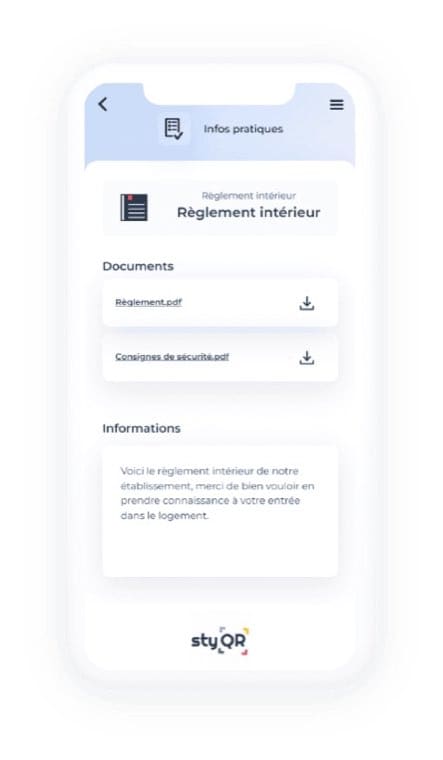
- 13If you use a digital welcome book
- 14What to remember
- 15Frequently asked questions
For any booking made from 20 November 2026 onwards, Airbnb restricts what you can require of your guests. Departure chores can no longer be imposed, all your rules must appear in the listing, and contracts, data collection or mandatory access apps become exceptions. Here’s what changes in practice, what you keep, and how to update your materials without surprises.
The essentials in 30 seconds
Updated 28 October 2026. These are Airbnb policies announced for 20 November, not a new French law. The Airbnb policy on house rules and reasonable requests sets out expectations for hosts and guests.
The relevant date is the booking date, not the check-in. A stay in December booked in October remains subject to the previous policies and the rules published at the time of booking.
Your rules and requests must appear in the listing, before booking. A message, a welcome book or a note on the fridge may remind guests of them, but cannot add new requirements.
Check-out chores can generally no longer be imposed: washing and putting away dishes, removing bedding or taking bins off the property. Asking guests to leave dishes in the sink remains permitted.
Contracts, ID checks, off-platform security deposits and access apps are only possible in cases allowed by Airbnb policies, with the required information provided before booking.
Your rules remain enforceable. If a guest breaches them, contact Airbnb to determine the appropriate next steps; the platform gives, for example, the option of cancelling without fees or other consequences.

Why Airbnb is changing its rules
Airbnb says it heard guests find some house rules confusing or burdensome. The platform therefore clarifies what a host may request, with examples of acceptable gestures and cleaning tasks that are generally not allowed.
These are two internal Airbnb policies, “House rules and reasonable requests” and “Limiting contracts and other host-imposed conditions”. They govern bookings made on that platform. They do not replace the legal obligations that apply to your property.
The date that matters: the booking, not the stay
The change is implemented in two stages. Airbnb introduced the new house rules editor on 20 October 2026. The new policies apply to bookings made from 20 November 2026 even if the stay occurs much later. Conversely, a booking confirmed before that date is governed by the previous policies and the rules that were in the listing when the guest booked.
You will therefore have stays in the same calendar that are booked under different frameworks. Before sending a reminder, check the booking date. Changing your house rules after confirmation does not alter the rules already applicable to that guest.

At check-out: what you can no longer request, and what remains allowed
Airbnb distinguishes reasonable requests from tasks that require significant effort or normally fall to cleaning between stays. The context of the property may matter: the platform says it can consider certain exceptions. To organise your team’s work without passing it to guests, use a cleaning checklist separate from check-out instructions.
| Topic | You generally cannot require | You can still ask |
|---|---|---|
| Dishes | Washing and putting them away | Leaving them in the sink |
| Linen | Removing bedding, starting a wash | Gathering used towels |
| Rubbish | Taking bins off the property | Sorting rubbish into the indoor bins provided |
| Equipment | Banning use of an item listed as available | Switching off the air conditioning when leaving |
| Penalties | Charging for a specific uncompleted check-out task | Separately documenting damage or unexpected cleaning costs |
Permitted requests must also appear in the relevant section of the listing. If Airbnb finds a non-compliant request, it can be flagged in the editor; you may clarify it. If the issue continues, a warning may appear on the listing.
An uncompleted task is not automatically damage. If the property is actually damaged or needs unexpected cleaning, document that separately and use the appropriate Airbnb process. Ordinary cleaning fees are shown before booking and form part of the price guests compare.
Your rules must be in the listing, and nowhere else
For new bookings, your rules and requests must be published in the "House rules and requests" section of the listing before the guest books. Other parts of the listing, messages and panels cannot be used to introduce an additional rule.
After booking, you may remind guests of a published rule. You cannot tighten it by message, in the welcome book or in person. The welcome book remains useful to explain where the bike shed is or how to close the shutters; it does not create a new obligation.
Airbnb distinguishes rules, which the guest must follow, and requests, which they are encouraged to honour. A quiet hours schedule is a house rule; leaving used dishes in the sink is a request. That classification matters more than the tone used.
What you keep
Your rules published before booking remain applicable. The guest can consult them in the listing and find the ones for their booking in their Airbnb account.
If a guest breaches a rule during the stay, or indicates before check-in that they will not comply, Airbnb cites the possibility of cancelling without fees or other consequences. Contact the platform to review your case before acting: an unfulfilled reasonable request is not treated as a breached rule.

Can you still require a separate rental contract?
Yes, in cases allowed by the Airbnb policy on contracts and other host-imposed conditions: where applicable law or an owners’ association rule requires it, for a stay of at least 28 nights, for a Luxe property or for access to optional amenities. Airbnb may request proof of the exception invoked.
An authorised contract must appear in the listing’s “Contracts” section before booking. A contract sent afterwards, or slipped into the welcome book, does not remedy this absence. Airbnb states that it does not require the guest to sign and will not enforce clauses on your behalf.
Remove from your messages and your welcome book the phrasing “signature required before key handover” if you cannot justify the exception for that property. If an exception applies, check that the posted contract and your message match.
ID checks and personal data
As a general rule, the new Airbnb policy does not allow requiring a copy of ID, a selfie, an email address or other personal data during booking or the stay. Exceptions include a legal obligation, a documented owners’ association rule or preparation of an authorised contract.
In such cases, state before booking, in the “Requests” section, the data required and the reason. The policy also allows a visual ID check at arrival if this requirement is announced in that section, without retaining a copy except where an applicable exception allows it. Limit collection to what is necessary.
A checkbox “I agree to send my passport” does not create an exception to Airbnb policy. The CNIL also reminds that consent is only one possible legal basis for data processing. Have the justification and the information provided to guests checked before putting a form into service.
Off-platform security deposits
Most hosts cannot request a security deposit or a bank pre-authorisation outside Airbnb. the Airbnb payment and security deposit policy provides exceptions, notably for some hosts connected via software, provided the deposit is shown in the appropriate fee field before booking.
Being a property management company or using software is therefore not enough to establish your eligibility. If you cannot confirm that the listing is authorised to collect a security deposit and that its amount is disclosed before the booking, do not send a payment link afterwards. A condition report for a holiday rental can document the property; it does not make an external deposit collection authorised.

Self check-in and apps
Self check-in remains possible. You can send digital instructions or offer an access app. Under the new Airbnb policy, if that app requires registration, you must provide another way for the guest to enter if they request it, except where an exception applies.
Check the process from the phone of someone who has not installed your app. If the only button leads to account creation, your fallback is not a fallback. With StyQR, the guest views the welcome book without creating an account. You can explain the route to the property and the check-in steps there, then send the access code via Airbnb messaging. The welcome book helps find the door; it does not replace the alternate means of entry if your access app requires registration.
How to update your materials
Start with the listing: a message or a welcome book cannot correct a condition that was absent when the guest booked. Proceed property by property and keep the distinction between rules, requests and simple practical information.
The Airbnb listing. Re-enter rules and requests in the new editor. Check the possible contract, the data requested, the deposit and the access method separately.
Scheduled messages. Remove obligations not present in the listing or not allowed by policy. Check which bookings each message will be sent to.
The welcome book. Keep it focused on access, Wi‑Fi, amenities and reminding of instructions already published. An example Airbnb welcome book helps distinguish these items from booking conditions.
| What you plan | Where to announce it before booking | What the welcome book or a message cannot do |
|---|---|---|
| A check-out rule or request | Section “House rules and requests” | Add an obligation discovered after booking |
| A contract covered by an exception | Section “Contracts”, with its terms | Make a contract applicable if it was absent from the listing |
| A justified data collection | Section “Requests”, with the data and reason | Turn an unauthorised collection into a condition of access |
| An authorised off-platform deposit | Corresponding fee field | Reveal its amount after booking |
For property management companies, prepare two distinct messages: a reminder of the published conditions for new bookings and an arrival message limited to practical information. Do not automatically trigger the first for a booking made before 20 November. When a legal exception remains to be established, verify it before altering the guest journey.
Message templates to adapt
These texts are starting points. Adapt them to your listing and remove those that do not apply to the property. They do not exempt you from publishing the required information before booking.
Arrival message, for all bookings
Hello, your check-in is approaching. The rules and requests applicable to your booking are in your Airbnb account. To reach the property, here is the welcome book link with the address, directions and practical instructions: [property link]. If an access instruction does not work, reply directly in this messaging.
Contract, only if an authorised contract appears in the listing
For this stay, a separate contract is shown in the listing’s “Contracts” section, with the terms you could view before booking. To find the contract or ask a question, message us via Airbnb.
Identification, only if an exception applies
If an identification formality is required for this property, it is indicated in the listing’s “Requests” section, with its justification. We will specify before any collection which data are needed, who processes them, how long they are kept and how to exercise your rights.
This text is not a complete data‑protection notice: provide the actual information before use.
Security deposit, only if your listing is eligible and configured
The deposit shown in your Airbnb booking is managed according to the terms presented before booking. You have no other payment to make to receive entry instructions. For queries about the amount or its return, message us via Airbnb.
Access without a mandatory app
Welcome! You can view the access map and instructions in our welcome book, without creating an account. To enter, use the code sent via Airbnb messaging. If you prefer not to use the proposed lock app, reply to this message: we will tell you the alternative access method.
Before sending that final message, make sure the alternate access method actually exists.

If you use a digital welcome book
A digital welcome book explains check-in and how the property works. It does not replace the listing and does not change it. After each change, compare the listing, messages and the welcome book. For a single property whose instructions rarely change, a shared document may suffice; the StyQR welcome book update avoids resending a file when content changes, but does not update Airbnb.
Also think about translations. StyQR internal observation: 40 % of visits to our welcome books are in a language other than French. An instruction corrected in French must be checked in the active languages: re-request its translation if needed, then proofread the access instructions. The StyQR FAQ on languages and translations explains how to proceed.
What to remember
For bookings covered by the new policies, rules and requests must be visible in the listing’s designated section before booking. Messages and the welcome book may then remind guests, but cannot add new requirements. Contracts, data collection and deposits each follow their own conditions.
Start by comparing your listing with your scheduled messages, then with your welcome book. Check confirmed bookings separately: changing the listing does not alter the rules they recorded.
Frequently asked questions
Is a stay in December booked in October affected? No, if the booking was made before 20 November 2026. The previous policies and the rules published at the time of that booking continue to apply.
Can I ask the guest to wash the dishes before they leave? The new policy generally does not allow you to require them to wash and put away dishes. You may ask them to place used dishes in the sink, provided this request is stated in the listing before booking.
Is a contract sent after booking sufficient if it is legally required? No, its necessity does not exempt you from having it appear in the "Contracts" section before booking. Check the applicable exception and the content actually presented to the guest.
Can I make the access code conditional on a check-in form? Not if the form requires personal data, an account or a third-party app outside the stated exceptions. If you rely on an exception, explain the data requested and why in the listing before booking.
Does my welcome book automatically update my listing? No. An edit to the StyQR welcome book is visible via its usual link and QR code, but it does not change the Airbnb house rules, declared fees, or scheduled messages. Manage those materials separately.
On the same topic