Airbnb welcome book example
An Airbnb welcome book example you can open on your phone, what it should contain section by section, and how to share it with your guests.
The Airbnb welcome book is the document your guests open when they have a question and you are not there : the wifi code, the check-out time, which bin goes out on which day, the restaurant that still serves at 10 pm. Done well, it saves them writing to you and saves you having to reply. It also sets the tone of the stay, before the first night has even begun.
You will find here an example of an Airbnb welcome book to open on your phone, a list of what it should contain, section by section, and how to get it to your guests. It is the model to follow, whether you build it in Word, in Canva or online.
What information should you put in your welcome book?
Start with whatever saves you a phone call. The rest is comfort, and it comes afterwards.
- The wifi code, written out in full, or how to connect to the hotspot. It is the first thing your guests look for as they put their bags down.
- The access codes : building entry code, key box, gate. A code missing from the welcome book means a midnight call from someone stuck outside the door.
- The basic details about the property : check-in and check-out times, house rules (smoking, pets, parties), number of bedrooms and beds, waste sorting and collection day.
- Instructions for the appliances : television, washing machine, oven, heating, shutters. Two lines per appliance is enough, and it spares you the Sunday evening call.
- Useful numbers : yours first, then the on-call doctor, the pharmacy and, if you have one, the neighbour who can step in when you are away.
- Transport : how to get there from the station or the airport, where to park, bus times and fares if the property depends on them.
- Your local recommendations : a good restaurant, a bar, a bakery, the market, the places worth seeing. A map helps those who do not know the area.
- A guest book, at the end of the welcome book, so that guests tell you what they thought of the stay before they say it in public.
Here, at a glance, is what a complete Airbnb welcome book contains and the phone call each section saves you.
| Welcome book section | What you write in it | What it saves you |
|---|---|---|
| Wifi | The code, or how to connect to the hotspot | Guests with no connection the moment they arrive |
| Access codes | Entry code, key box, gate, written out in full | A call in the middle of the night from someone stuck outside |
| The property | Times, house rules, bedrooms and beds, waste | The same questions over and over, and a botched check-out |
| Appliances | Two lines per appliance : television, washing machine, oven, heating | The Sunday evening call |
| Useful numbers | Yours, the on-call doctor, the pharmacy, the neighbour who helps out | Guests who do not know who to call |
| Transport | Getting there from the station or airport, parking, bus times | A missed connection and a late arrival |
| Local recommendations | A restaurant, a bar, a bakery, the places worth seeing | Searching blind in an unfamiliar area |
| Guest book | What guests felt about their stay | A public review you could have put right beforehand |

How do you make an Airbnb welcome book?
The content matters more than the format. First write the eight sections above in the order of the stay : the journey, the arrival, the property, the area, the departure. If you would like some text to copy, the complete welcome book template, section by section, with a worked example, is written for exactly that.
Then there are two ways to build it.
A Word document or a PDF. A cover with a photo of the property, an uncluttered layout, a heading per section, a few photos to help people find their way. You send it by message before check-in, or you print it and leave it on the table. It does the job as long as nothing changes. The day the gate code changes, you have to reopen the file, export it again, send it again, and guests already on site keep the old version.
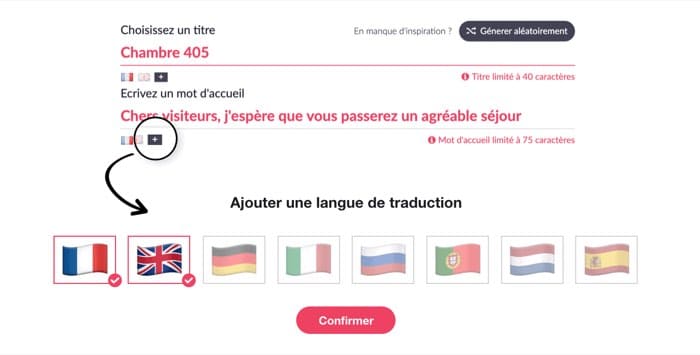
A digital welcome book. With StyQR, you fill in the sections in your online account and the welcome book opens on the guest's phone via a link or a QR code. A correction is made once and everyone sees the updated version, including stays already under way. The welcome book appears in the language of the phone, which matters : 40 % of StyQR welcome book openings happen in a language other than French. The trial lasts 14 days, with no bank card.
What the format changes comes down to this table.
| Format | Updating | Delivery |
|---|---|---|
| Word document or PDF | You have to reopen the file, export it again, send or print it again | Sent manually before check-in, or handed over in person |
| Digital welcome book (StyQR) | Corrected once, visible to everyone, including stays under way | Link sent before check-in, QR code scanned on site |

Our Airbnb welcome book example
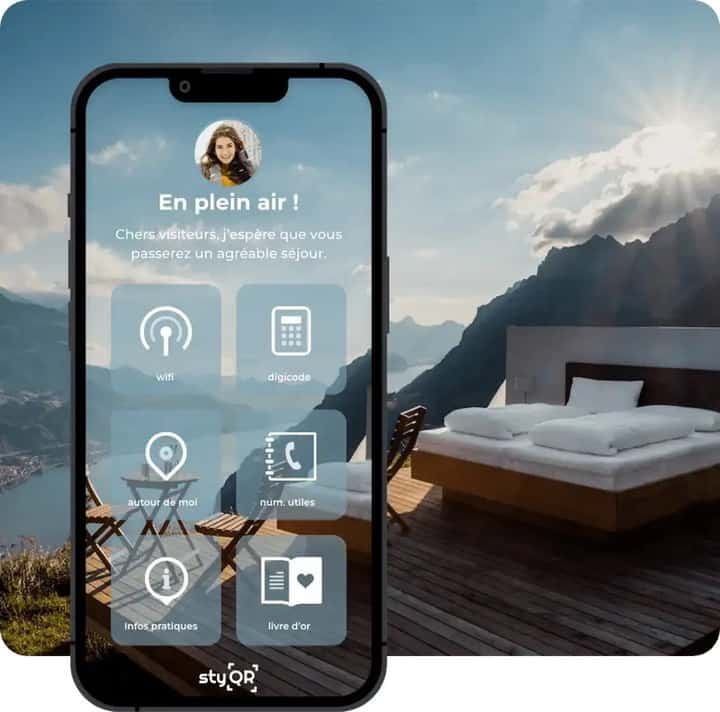
Here is an example of a welcome book for a holiday rental or an Airbnb, exactly as the guest sees it. To open it, scan the QR code below with your smartphone or click this link. Look first at the order of the sections : that is the most useful thing to copy, ahead of the content itself.

How to get the welcome book to your guests
Two steps, and they work together. The link, sent by email, text or WhatsApp a few days before check-in : the guest reads the directions and the access instructions at the moment they need them, on the train or in the car park. The QR code, printed and placed in the property, near the front door or the router : they scan it on arrival and find everything on their phone, including when they are out for a walk.
All the same, keep a sheet of paper with the wifi code and the access codes on the table. A QR code with no signal opens nothing : the guest needs their mobile data or your wifi to read the welcome book the first time.
One last point, the one most often overlooked : the structure can be reused from one property to the next, the content cannot. Codes, appliances and addresses change, and a guest spots straight away a welcome book that is not about the house they are sleeping in.
Create your welcome book with StyQR
Frequently asked questions
What do you put in an Airbnb welcome book? The wifi code and the access codes first, then check-in and check-out times, the house rules, instructions for the appliances, emergency numbers, transport with times and fares, and your favourite spots : restaurants, bars, places worth seeing. The rest is comfort.
Do you really have to write the wifi code and the entry code in the welcome book? Yes. Your guests want to get connected the moment they put their bags down, and an entry code missing from the welcome book means a midnight call from someone stuck outside the door. Write them out in full, somewhere they can be found without searching.
Which phone numbers should I give my guests? Yours first, since you are the one people call. Add the on-call doctor, the pharmacy and, if you have one, the helpful neighbour who can step in when you are away. Those three lines reassure guests more than all the rest of the welcome book.
Should I make my welcome book in Word or go digital? A Word document or a PDF does the job as long as you never touch it again. As soon as the door code changes or a restaurant closes, you have to reopen the file, export it again, send it again. A digital welcome book is shared via a link or a QR code and is corrected in a minute.
Does creating an Airbnb welcome book with StyQR cost anything? The trial lasts 14 days, with no bank card and with every feature included. After that, the subscription is 49 € excl. VAT per year per property, and the prices are published on the pricing page.
What is the point of a guest book inside the welcome book? It lets your guests say what they thought of the stay in your welcome book rather than in a public review. What they write tells you what to put right before the next check-in.
On the same topic