Digital welcome book or Canva PDF: which should you choose?
Canva produces a fixed PDF: perfect for printing, but it has to be redone every time something changes. A digital welcome book is corrected once for everyone and translates itself. Here's how to decide.
Canva is for making a welcome book as a PDF: fixed, perfect for printing, and to be redone every time something changes. A digital welcome book opens via QR code on the guest's phone, is corrected once for everyone and is translated automatically. The PDF suits occasional lets; digital takes over as soon as the information moves.
What Canva does very well
Canva is an online layout tool, free in its basic version. For designing a welcome book, it delivers: ready-made templates, a few minutes to get the hang of it, and a clean PDF export. A host who wants pixel-perfect control over their layout can manage it without knowing any design software.
The free version is more than enough to produce a welcome book: for this purpose, the Pro subscription adds nothing but extra templates and the brand kit. In other words, price is not what this comparison is about.
The resulting PDF has one quality the web does not: it prints. For a folder sitting on the living room table, that is exactly what you need.
Where the PDF falls short, once the stay has started
A PDF is a fixed document. That quality, which makes it a good print format, becomes a flaw as soon as the information moves: a wifi code that changes, a bin that gets moved, a restaurant that closes. You have to reopen the file, correct it, export it again, then send the new version to every guest who already has the old one. Stays already under way keep the out-of-date version.
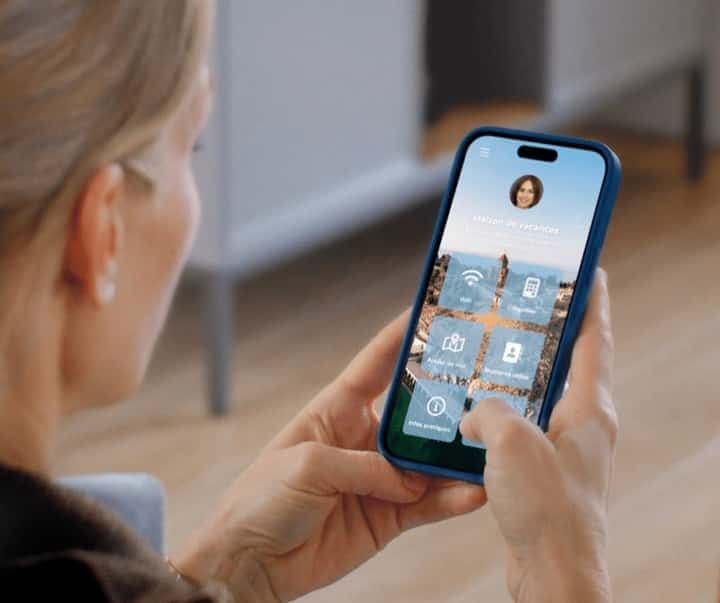
The second sticking point is the screen. Across StyQR welcome books, 91% of openings come from a phone. Yet a PDF designed in A4 opens in A4: the guest zooms, drags and gets lost. The most common format on the host's side is the least comfortable on the guest's side.
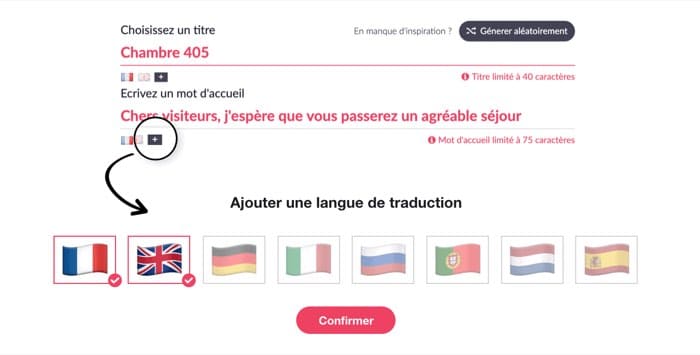
The third is language. 40% of StyQR welcome book openings happen in a foreign language. With a PDF, each language is one more file to write, correct and resend. Three languages means three documents to maintain in parallel.

The comparison, point by point
The table below compares the two solutions on the criteria that really decide things, once the welcome book is in a guest's hands.
| Criterion | PDF made in Canva | StyQR digital welcome book |
|---|---|---|
| Correcting a piece of information | Reopen, re-export, resend to everyone | You edit it, it is up to date for everyone, immediately |
| Stays already under way | Keep the out-of-date version | See the correction without doing a thing |
| Reading on a phone | A4 format to drag and zoom | Web page suited to the screen |
| Languages | One file per language, to maintain | 14 languages translated from your text |
| Access for the guest | A file to dig out of their emails | A QR code in the property, a link to share |
| Local recommendations | List written out by hand | Geolocated addresses, distances and directions |
| Knowing what gets read | No visibility at all | Views, modules opened, languages used |
| Printing | Excellent, that is what it is for | Poster with QR code to put up in the property |
| Headline cost | Free | 49 € excl. VAT per year per property |
| Real cost | Your time, with every change | Updates and translations included |
Three cases where the PDF is still the right choice
An honest comparison has to say when the solution it argues for is not the right one. A PDF made in Canva is still preferable in three situations.
You let your place for one or two weeks a year. For two stays over the summer, update time is not an issue. A well-made PDF, sent along with the keys, does the job.
You want a printed object. A welcome book on the coffee table, in a house without decent coverage, keeps all its value. And nothing forces you to choose: many of our hosts keep something on paper and display a QR code next to it.
Your information never changes. No access code, no varying opening hours, no local recommendations: fixed costs you nothing.
As soon as one of those three points gives way, the maths flips.

What each solution really costs
Comparing a free tool with a subscription looks unfair as long as you only count the money. Canva is free in its basic version, and the Pro subscription adds nothing essential for a welcome book. The StyQR digital welcome book costs 49 € excl. VAT per year per property, with discounts from 10 properties upwards and every feature included.
The real comparison is about time. On the PDF side, every change of information means reopening the file, correcting it, exporting it again, resending it, and starting over for each language. On the digital welcome book side, it is one edit, once, visible immediately to everyone, translated automatically.
With one property and two stays a year, the PDF wins. From several stays a month, or several properties, the time spent quickly outweighs the price of the subscription.
What about guests who are not comfortable with a phone?
Plenty of hosts hesitate to leave paper behind, telling themselves that their older guests will prefer it. Generally, it goes very well: they like finding the welcome book in advance, in the message they receive before setting off, and searching as little as possible once they arrive. There is nothing to install and no account to create: the welcome book opens in the phone's browser, like a web page, and in their own language.
What actually bothers them is not the screen, it is the QR code when nobody has shown them how. Send the link before check-in, show them the scan at the key handover if you are there, and leave a printed sheet with the wifi and the codes on the table. Nothing stops you keeping something on paper linked to the digital welcome book: that is the set-up described just below.
Can you keep both?
Yes, and that is what many hosts do. The digital welcome book carries the information that moves: the wifi, the access codes, the opening hours, the local recommendations. Paper carries what does not move and puts people at ease: a word of welcome, the layout of the house, the safety instructions.
In this set-up, the most useful printed item is not a twenty-page folder but a poster with a QR code, put up by the door or near the router. The guest scans it on arrival and finds everything on their phone, in their own language.

Frequently asked questions
Does a digital welcome book really replace paper?
A digital welcome book replaces the folder for everything that changes: wifi, access codes, opening hours, addresses. Many hosts also keep a short printed item alongside it, often a poster with a QR code, for the welcome and the safety instructions. The two complement each other more than they compete.
Does the guest have to install an app?
No. The StyQR welcome book opens in the phone's browser, after scanning a QR code or tapping a link. There is nothing to download, no account to create, and it works on iPhone as well as Android.
Can you create a welcome book for free?
Canva lets you create a welcome book for free, export it as a PDF and print it. StyQR offers a 14-day trial with no card details, with every feature included. After that, the subscription starts at 49 € excl. VAT per year per property.
How many languages should you plan for?
It depends on your clientele, but the order of magnitude is clear: 40% of StyQR welcome book openings happen in a foreign language. English covers a good part of the need, with Spanish, German and Italian filling the gaps depending on the region. On a digital welcome book, translation is done from your own text, with nothing to rewrite.
What happens if I change the wifi code mid-season?
With a PDF, you have to correct the file and resend it: guests already on site keep the old one. With a digital welcome book, you edit the wifi module and the correction is visible immediately, including for stays under way.
Does the QR code work without a connection in the property?
Scanning opens a web page: a connection is needed, either the guest's mobile data or your wifi. That is why the wifi code has to stay available some other way, for example on the poster itself or in the check-in message.
On the same topic