Airbnb house rules: the template and what it is really worth
The legal framework, how it works on Airbnb, a ten-point example to copy, and the place where your guest will actually read it.
In short. A set of Airbnb house rules fits on one page: check-in and check-out times, the number of people, noise, parties, smoking, pets, the cleaning you expect, and what happens if something gets broken. They are only worth something if they are known and accepted before the booking, which is what article 1119 of the French Civil Code says, and that is precisely where Airbnb displays them. The full template is further down, ready to copy.
This guide sets out the legal framework, how it works on Airbnb, an example you can adapt, and how to pass it on to your guest so that it actually gets read. Updated 11 September 2026.
What are house rules for, and what are they worth?
They let you write down once what you repeat at every stay, and give you something to refer to when things go wrong. Their legal weight rests on one simple rule, that of article 1119 of the French Civil Code: general terms are only binding on the other party « if they have been brought to that party's attention and that party has accepted them ». Rules discovered on the fridge door on arrival therefore bind nobody. Rules read and accepted at the time of booking do.
They do not replace the law. Night-time noise, for instance, is already an offence: between 10 pm and 7 am, it falls under article R. 623-2 of the French Criminal Code, with a fixed fine of 68 €, rising to 180 €, and up to 450 € before a court, according to service-public.fr. Your rules restate the law and make it concrete for your property; they do not create it.

How does it work on Airbnb?
Airbnb has a field for this. According to its help centre, the rules are entered from the listing: « Click Listings, then select the listing you want to edit. In the listing editor, click Arrival guide. Click House rules and make your changes. »
What matters is where they then appear. Again according to Airbnb, « your house rules are shown in your listing description, in the booking terms at the time of booking, in the automated emails sent to guests, and in the Arrival guide ». Your guest therefore has them in front of them before paying, which settles the article 1119 question.
And if a guest does not follow them? Airbnb points to its ground rules for guests, which include respecting the host's rules, and states: « contact us to report the problem or request payment for damage through the Resolution Centre ». For a claim to succeed you need two things: clear rules, and evidence, which brings you back to the check-in condition report and your photos, and to the process described on the check-in and check-out page.

Example house rules, to adapt
Here is a set of rules for a two-bedroom city-centre flat let to four people. Copy it, change the times and the amounts, delete anything that does not apply to you. Short rules are rules that get read: ten points are enough.
- Check-in and check-out. Check-in from 4 pm, check-out before 10 am. A check-in after 9 pm or a late check-out should be requested by message the day before.
- Occupants. The property sleeps four people at most, those named on the booking. A daytime visitor is welcome; they do not stay the night.
- Noise. Between 10 pm and 7 am, the building is asleep: no music audible from the landing, no conversations on the balcony. Night-time noise is an offence, and your neighbours for the week live here all year round.
- Parties and events. The property hosts no parties, gatherings or filming, whatever the number of people involved.
- Smoking. Smoking indoors is not allowed. The balcony is fine, using the ashtray provided.
- Pets. A dog under 15 kg is accepted on request, never on the sofa or in the bedrooms. No other animals.
- Appliances. The dishwasher, the washing machine and the hob all have their instructions in the welcome book. If something breaks down, tell us before taking anything apart.
- Departure. Washing-up done, bins taken out (recycling: glass in the green bin, packaging in the yellow one), bed linen left on the beds, windows closed, keys in the box.
- Breakages and damage. A broken glass will not be charged for if you tell us. Damage that is not reported is deducted from the deposit, on the basis of the condition report and a supporting document.
- Security. The address of the property and the door code are not to be shared. Never leave the main door of the building open.
What makes these rules hold up is precision: « no music audible from the landing » can be checked, « be considerate of the neighbours » cannot. Each rule says what is allowed as much as what is forbidden, and gives the guest a way of doing things rather than a blunt ban.
What not to put in them
Made-up penalties. A 200 € « fine » for an open window has no basis: you can deduct proven damage from the deposit, not impose a punishment. Nor should you include rules you will never check: they weaken the ones that matter. And nothing that contradicts your listing, since your guest booked on the strength of that listing.
One rule that comes up often and does not hold: requiring guests to leave a review. A review can be asked for, it cannot be imposed. As for the deposit itself, state the amount and what it covers; the rest is settled with the condition report.
The table below lists the most common wordings and what they are actually worth once the stay has started.
| The point to settle | What holds up | What does not |
|---|---|---|
| Noise at night | “Between 10 pm and 7 am, no music audible from the landing” | “Respect the neighbours”, which cannot be checked |
| Damage found | Deduction from the deposit, based on the inventory and a supporting document | A “fine” of €200 for an open window, with no legal basis |
| Guest review | A review is asked for | An obligation to leave a review |
| Consistency with the listing | Rules that match what the listing says | A rule that contradicts the listing they booked on |
| Length of the text | Ten points, all verifiable | Rules you will never check, which weaken the others |
Where to put them so they get read: the welcome book
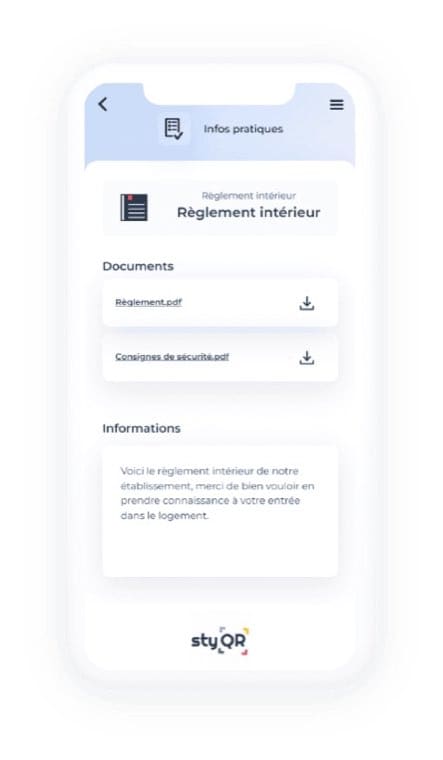
Rules accepted at booking are often forgotten by check-in. The digital welcome book is where your guest finds them again at the right moment, next to the wifi code and the house instructions, on their phone, in their own language.
In StyQR, the rules go in the Practical info module, in a « House rules » category that you create if it does not exist yet, with its icon. Paste in your text, or attach the document. One line in your welcome message is enough to flag it. If you also want a version displayed in the property, the paper welcome book can be generated from the platform, house rules included.
When a rule changes, a check-out time or a recycling instruction, you correct it once in the welcome book and every guest after that sees the right version. That is the advantage over the sheet taped to the wall, which is never up to date.
Frequently asked questions
Are house rules compulsory on Airbnb?
No. Airbnb offers the field and displays the rules, but does not require them. Without rules, Airbnb's ground rules for guests and the law apply, and you have nothing specific to fall back on if there is a problem.
Does the guest have to sign the rules?
On Airbnb, no: they accept them by booking, since the rules appear in the booking terms. For direct bookings, include them in the contract or in the terms sent before payment, to comply with article 1119 of the French Civil Code.
Can I include a fine in my rules?
No. You can deduct proven damage from the deposit, on the basis of the condition report and a supporting document. A flat penalty you decide on your own has no legal basis.
What should I do if a guest throws a party despite the rules?
Tell Airbnb straight away through the messaging system, gather evidence (neighbours' statements, photos after check-out), and claim for the damage through the Resolution Centre. For noise, neighbours can also call the police: night-time noise is an offence.
The logical next step: copy the example, adapt it to your property, paste it into Airbnb and into your welcome book. If you do not have a welcome book yet, you can create one online and try it free for 14 days from the page for rentals.
On the same topic