How to translate your welcome book
Do you sometimes host guests from abroad? Discover our tips for translating your welcome book!
Do you rent out (or swap) your property, run a hotel, a guest house, a campsite, and sometimes welcome foreign guests? This article is for you!
Foreign tourists, especially if they do not speak the local language, can quickly feel lost because of the lack of information in their native language.
It is therefore important to provide them, in their language, with the right information so they can fully enjoy their stay!
Discover our tips on how to translate your welcome book into several languages.How do you translate the elements of your StyQR welcome book? Start by creating your StyQR welcome book by clicking here.
The easiest approach is to set up your welcome book completely, in French, first. Once the setup is complete, you will need to switch to a Premium account to access translation features.
On the " Your welcome books " page, click the welcome book you want to edit.
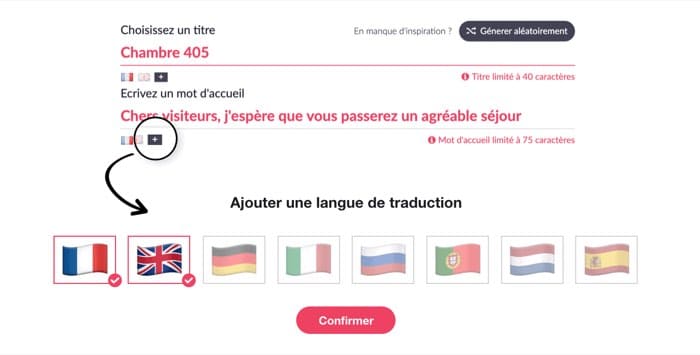
On each text area, you can click the flag " + " to add a translation language. In addition to French, 7 languages are available: English, German, Italian, Spanish, Dutch, Portuguese and Russian.
You can then either write the translation yourself if you are comfortable in the language, or click " Generate an automatic translation " if you want us to take care of it for you!
Thus, the text areas to be translated are in:
, Welcome book info
, WiFi Module (if you use a Hotspot)
, Code lock Module
, Useful Numbers Module
, Practical Info Module
, Guestbook Module
All other elements of the welcome book will be automatically translated.

How does it work for your guests ?If you have a StyQR Premium account and your welcome book has been translated, your guests will access your welcome book directly in the default language of their web browser.
If their language has not been configured, then English will be offered as the default language.
The basic elements of the welcome book (interface, module names…) will be automatically translated, without any action required from you.
Would you like to test the translation of your welcome book? To do so, change the default language of your phone (Settings > General…) or of your web browser (Chrome, Safari…), then access your welcome book via the URL link or the QR Code. You now have everything you need to create your digital, multilingual welcome book!
Ready to get started?
Frequently asked questions
Do I need to switch to Premium to translate my welcome book? Yes, translation is only available with a Premium account. You can set up your welcome book in French first, then switch to Premium to add other languages.
Which languages are available for translation? StyQR offers seven languages in addition to French: English, German, Italian, Spanish, Dutch, Portuguese and Russian. You can activate as many as you like.
Can I generate an automatic translation or must I write it myself? You have the choice: write the translation yourself if you master the language, or click "Generate an automatic translation" to let StyQR handle it.
Which parts of the welcome book are translated automatically? The interface, module names and all the welcome book’s basic elements are translated automatically. Only the customised text areas (welcome book info, WiFi, code lock, useful numbers, practical info, guestbook) require manual or automatic translation.
How do my guests see the translation? Your guests access the welcome book in the default language of their web browser. If you have not activated that language, English is shown by default. They therefore automatically see the appropriate version without having to do anything.
How can I test that the translation is working correctly? Change the default language of your phone (Settings > General) or of your web browser (Chrome, Safari, etc.), then view your welcome book via the URL link or the QR code. You will immediately see the translated version.
StyQR offers seven languages in addition to French. Here is what you can translate, how your guests see it, and the conditions to access it.
| Item | Translation available? | Fallback language |
|---|---|---|
| Welcome book info, WiFi, code lock, useful numbers, practical info, guestbook | Only with manual or automatic translation (Premium account) | English |
| Interface, module names, basic elements | Automatically translated without action | English if the language is not activated |
| Access to translation | Premium account required | Host's browser language |
| Languages offered | 7 languages: English, German, Italian, Spanish, Dutch, Portuguese, Russian | English by default |
On the same topic