Boosting your rental bookings: a few tips
Short of ideas for a listing that stands out? Follow our tips!

Offer a fully equipped property
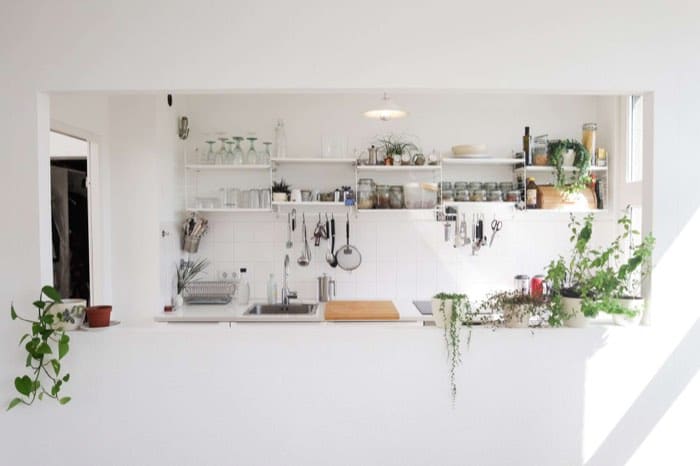
To help holidaymakers choose a property where they will feel at home, describe what’s available in yours. If your guests plan to work on site, say whether the wifi connection is reliable and whether the workspace is in a separate room or a designated corner. Also specify what the functional kitchen includes: oven, microwave, fridge, cookware and tableware. Guests will then be able to check whether your property meets their needs before booking.
In the list of amenities on the listing, tick only those that are present in your property, such as wifi, a workspace, an oven or a microwave. In the description, add what that list doesn’t say: the reliability of the connection, the location of the workspace and the utensils available.

Flexible cancellation and booking conditions
You can test flexible cancellation terms, then compare the bookings received before and after this change.
A self check-in can simplify the check-in. Instant booking allows a guest to confirm their stay without waiting for your response, especially when it’s a love at first sight. Try it if you can keep your calendar up to date and don’t need to approve every request. It won’t protect you from competition and doesn’t guarantee more requests.
If your calendar is not up to date, a guest may book dates that are already taken. If you need to check each request before accepting it, disable instant booking and keep manual approval. The guest will have to wait for your response, but you will avoid confirming a stay you cannot honour.
As for cancellation, that is up to you, but overly complex conditions or a refund that is not guaranteed can put people off booking.

Boost your short-term rental by accepting pets
If you accept pets in your property, indicate it in your listing. Guests who use this filter will be able to find your property. To know whether this brings you bookings, compare the requests received before and after adding this detail.
If you are unsure about allowing pets, you can limit acceptance to dogs and cats. State this rule in your listing.
If it’s fur that concerns you, specify the rooms where pets are not allowed. Before setting additional cleaning fees, check whether the platform you publish on permits them and calculate whether hosting pets actually increases your cleaning costs.
Set out all your conditions in the listing before the guest books: pets allowed, rooms off-limits and any extra cleaning fees. They will be able to verify whether their stay complies with your rules before confirming.
To see whether these changes affect bookings, compare the requests received before and after.
| Levier | Caractéristique clé | Avantage pour vous |
|---|---|---|
| Connexion Wi-Fi | Bande passante fiable et stable | Point le plus attendu des voyageurs, surtout avec le télétravail |
| Espace de travail | Pièce à part ou aménagement dédié | Attire les télétravaileurs et les familles en besoin de concentration |
| Cuisine fonctionnelle | Four, micro-ondes, frigo, vaisselle complète | Fidélise les vacanciers et les différencie des logements basiques |
| Réservation instantanée | Confirmation immédiate sans validation | L'hôte réserve sur un coup de cœur, vous évitez la concurrence |
| Conditions d'annulation flexibles | Remboursement clair et garanti | Réduit les freins à la réservation, augmente les demandes |
Frequently asked questions
Which amenities should I highlight in the listing? If your guests work on site, state the quality of the wifi connection and provide a workspace, however modest, if you can. Describe the kitchen too: oven, microwave, fridge and full tableware. To find out whether these details affect bookings, compare requests received before and after adding them to the listing.
How can I clearly display the amenities actually available in my listing?
State in the listing only the amenities that are present in your property. Specify whether the wifi connection is reliable and whether a workspace is available, however modest. For the kitchen, list what is on site: oven, microwave, fridge and tableware.
Should I enable instant booking? You can test it if your calendar is up to date and you can accept a stay without approving every request. A guest will then be able to confirm on a love-at-first-sight moment, without waiting for your response. You will remain in competition with other properties: compare your bookings before and after activation to judge its value.
Is instant booking suitable if I need to check each request before accepting it?
No. Instant booking allows the guest to confirm their stay without waiting for your response. If you need to check each request, keep manual approval.
What cancellation conditions should I offer? Terms that are too complex or a refund that is not guaranteed can deter some bookings, but their effect depends on your property and your guests. You can test flexible terms and compare bookings before and after this change. Self check-in can also simplify the check-in, without guaranteeing more bookings.
Should I accept pets in my property? If you accept them, state it in the listing: guests searching for this criterion will be able to find your property. To measure the effect on bookings, compare requests received before and after adding this detail.
How can I limit the constraints if I accept pets? You can limit acceptance to dogs and cats and state this in your listing. If fur worries you, specify the rooms where pets are not allowed. Check with your platform whether additional cleaning fees are possible, then assess the real extra cost before applying any.
Can I accept pets under certain conditions without promising to host all animals?
Yes. You can limit acceptance to dogs and cats and state this rule in your listing. You can also indicate the rooms where pets are not allowed. This way, guests know your conditions before booking.
On the same topic